Planning a website redesign? Follow this step-by-step checklist covering goals, budget, the build, redirects and launch, so you improve your site without losing your Google rankings.
A website redesign can be the best investment a small business makes, or an expensive mistake that wipes out years of Google rankings. The difference is almost always planning. Businesses that redesign with a clear checklist launch faster, keep their search traffic and end up with a site that brings in more enquiries. Businesses that skip the planning often find, a few weeks after launch, that their traffic has dropped and nobody knows why.
This checklist walks you through a redesign step by step: how to decide whether you need one, what to do before, during and after the build, and how to protect your SEO along the way. It applies whether you are in the US, the UK or anywhere else.
Do you need a redesign or just a refresh?
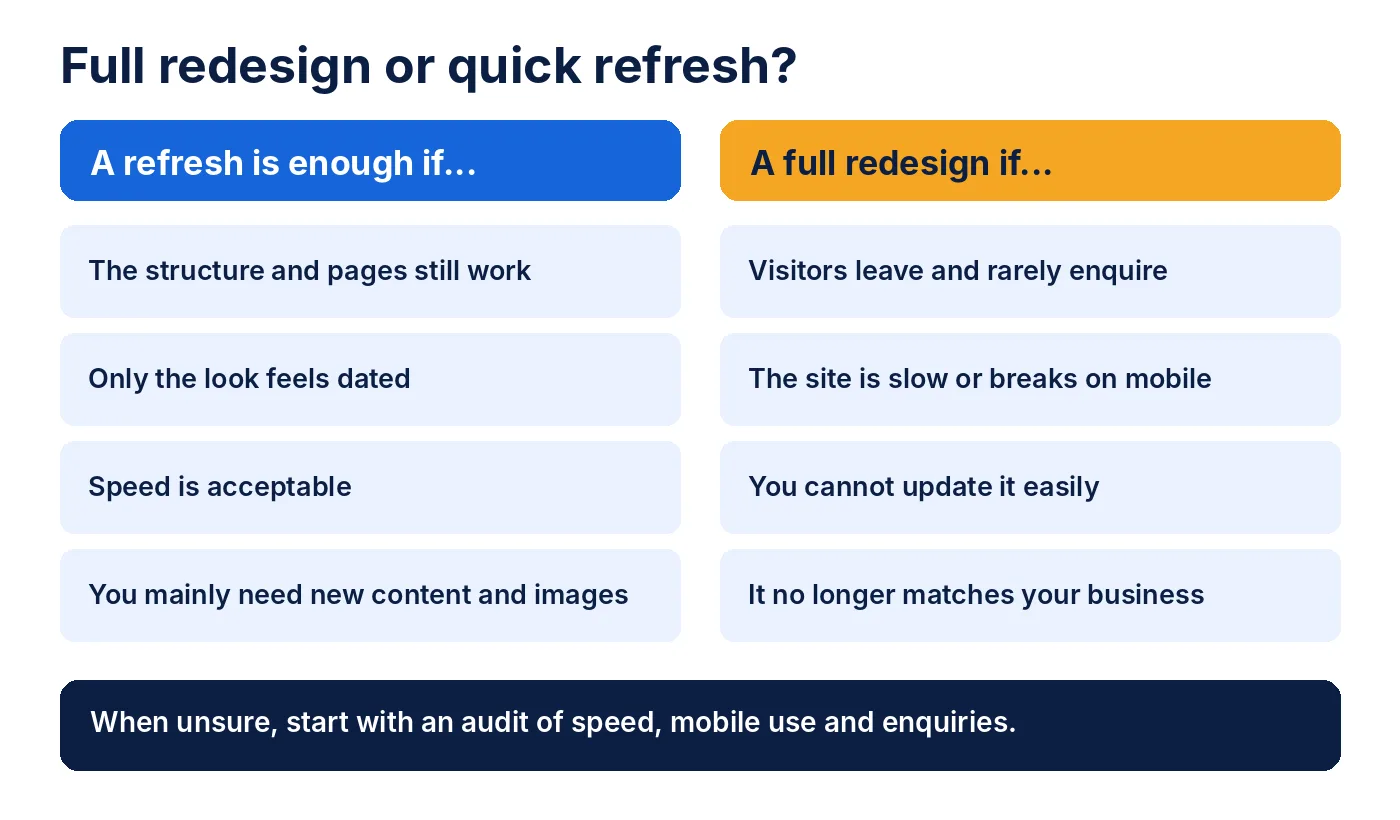
Not every outdated site needs rebuilding from scratch. A refresh updates the look, content and images on a structure that still works. A redesign changes the structure, design and often the technology underneath.
A refresh is usually enough if your pages and navigation still make sense, the site loads at an acceptable speed and mostly the visuals feel dated.
A full redesign is usually worth it if visitors leave without enquiring, the site is slow or breaks on mobile, you cannot update it easily, or it no longer reflects what your business does. If you are unsure, our article on the signs your business website needs a redesign will help you decide.
What to do: Before choosing, check three numbers: how fast your key pages load on mobile, how many visitors turn into enquiries, and how many visitors come from Google. These show whether the problem is looks, structure or performance.
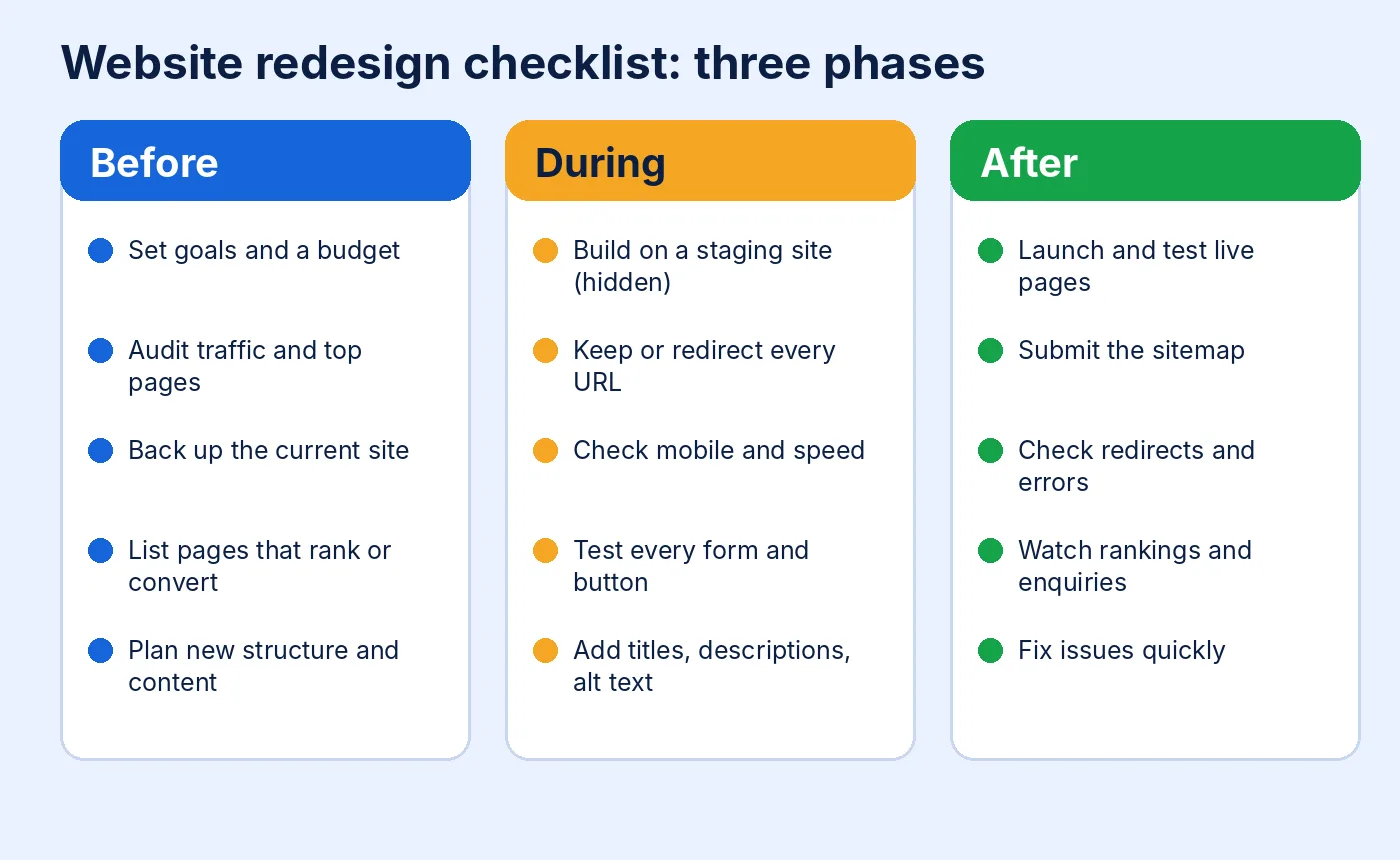
Phase 1: Before you start
Most redesign problems come from skipping this phase. Spend time here and the build goes smoothly.
1. Set clear goals. "A nicer website" is not a goal. "More quote requests", "faster pages" or "better mobile experience" are. Write down what success looks like in numbers.
2. Set a realistic budget and timeline. Costs depend on the platform, the number of pages and the features you need. Our guide to how much a website costs in 2026 explains the ranges for WordPress and custom-coded sites.
3. Audit your current site. Look at which pages get the most traffic, which ones lead to enquiries, which are slow and which have little value. Tools like Google Analytics, Google Search Console and PageSpeed Insights are free.
4. Back up everything. Take a full backup of your files and database, and save your content, images and forms. If anything goes wrong, you can restore the old site.
5. List pages that rank or convert. These are your most valuable pages. Mark them, because they need extra care during the move.
6. Study your competitors. Look at the sites ranking above you. Note what they do well, what customers see first and what you could do better.
7. Plan the structure and content. Sketch the pages you need, how visitors will move between them and what each page should achieve. Gather your text, photos, testimonials and logos early, because delayed content is the most common cause of late launches.
What to do: Create a simple spreadsheet listing every current page, its address, its monthly visits and whether you will keep, merge, improve or remove it.
Phase 2: During the build
1. Work on a staging site. A staging site is a private copy where the new design is built and tested. It should be hidden from the public and from search engines, so Google does not index a half-finished site.
2. Choose the right platform. WordPress, Shopify and custom-coded sites each suit different needs. If speed and full control matter most, custom code is worth considering, and if you want an easy editing experience, a clean WordPress build can work well. Whatever you choose, keep the setup lean, with a lightweight theme and only the plugins you really need.
3. Design for mobile first. Most visitors browse on phones. Buttons must be easy to tap, text easy to read, and key information such as your phone number and enquiry form easy to find.
4. Give every page one clear goal. A good page guides visitors towards a single action, such as "Get a quote" or "Book a call". Make that button impossible to miss.
5. Keep or redirect every important address. This protects your rankings, and the next section explains it in detail.
6. Carry over your SEO basics. Keep and improve page titles, descriptions, headings and image descriptions. Add helpful content rather than thin pages.
7. Optimise for speed. Compress images, avoid heavy scripts and choose good hosting. Slow pages lose visitors and rankings. Our guide to the best web hosting in 2026 can help you choose.
8. Test everything. Check every form, button, menu and checkout step on phones, tablets and desktops. Confirm that enquiries reach the right inbox.
9. Check legal basics. Include a privacy policy, cookie consent where needed (for example UK GDPR for visitors in the UK) and accessible design. These are easier to build in than to add later.
What to do: Ask your developer to share the staging link early, and review the site on your own phone, not just on a computer.
How to protect your SEO during a redesign
Traffic drops after a redesign are common, and they are usually avoidable. Most are caused by a handful of mistakes.
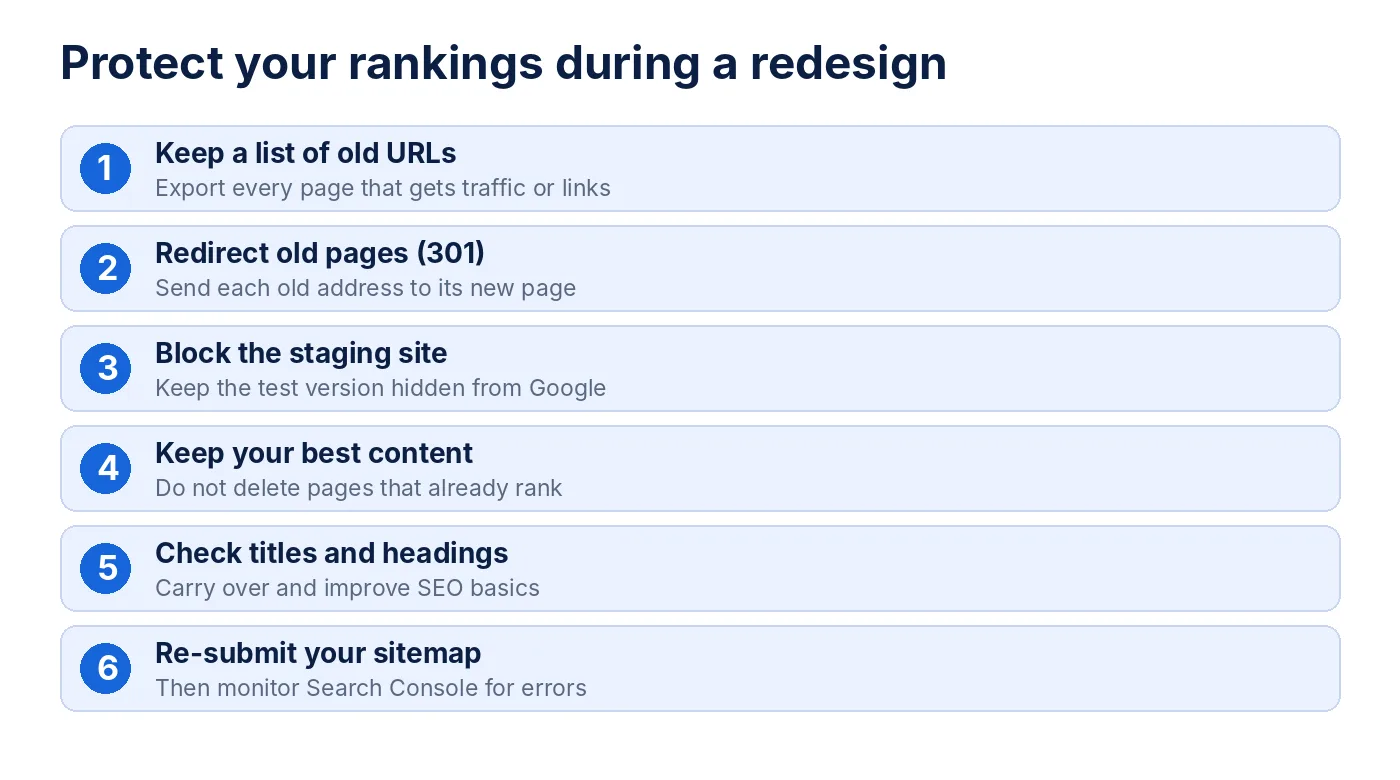
- Keep a list of old URLs. Before changes, export every page that gets traffic or has links pointing to it.
- Use 301 redirects. If a page address changes, redirect the old address to the new page so visitors and Google land in the right place. Without redirects, you create broken pages and lose the value the old pages earned.
- Do not delete pages that rank. If a page brings in traffic, improve it rather than removing it.
- Block the staging site. Make sure the test version cannot be indexed, and remember to remove any "noindex" setting from the live site at launch. Forgetting this is a classic and costly mistake.
- Keep your titles, headings and content strong. Do not replace useful text with thin, design-led pages.
- Submit your sitemap after launch. This helps Google discover the new structure, and Search Console will show any errors.
Changing your web address (domain) or platform at the same time as the design adds risk, so do it only if there is a strong reason and with a careful redirect plan.
Phase 3: After launch
Launch day is not the finish line. The first weeks matter just as much.
- Test the live site. Check pages, forms, checkout, phone numbers and links again on the real site.
- Check redirects and errors. Look for broken pages in Search Console and fix them quickly.
- Submit your sitemap and check indexing. Confirm that your important pages are being found.
- Monitor traffic, rankings and enquiries. Compare them with your pre-launch numbers. Small dips can happen, and larger drops need investigating at once.
- Check speed and mobile experience. Run PageSpeed Insights on key pages.
- Collect feedback. Ask customers and staff what feels better or worse.
- Plan ongoing care. Updates, backups, security checks and fresh content keep the site working. Pair the new site with an SEO plan so you gain visibility, and see our guide to how much SEO costs for a small business.
What to do: Set a reminder to review your analytics at two weeks, one month and three months after launch.
Common redesign mistakes to avoid
- Redesigning for looks without clear goals.
- Launching without redirects.
- Leaving the staging site open to search engines, or leaving "noindex" on the live site.
- Starting the build before the content is ready.
- Using a heavy theme with too many plugins, which makes the new site slow.
- Ignoring mobile design.
- Removing pages that were quietly bringing in traffic.
- Having no plan for after launch.
Common questions
How long does a website redesign take? A small business site typically takes four to eight weeks, depending on the number of pages, the content and the features. Delays usually come from late content and many rounds of changes.
Will a redesign hurt my SEO? It can if it is done carelessly, but it does not have to. Keeping important URLs, using 301 redirects and protecting your best content keep rankings safe, and a faster, clearer site can improve them.
How much does a website redesign cost? It depends on the platform and scope. A WordPress redesign usually costs less than a custom-coded one. Use a clear brief and compare quotes that list exactly what is included.
Should I redesign my website or build a new one? If the structure and content still work, a redesign or refresh keeps what is valuable. If the technology is outdated or hard to maintain, a rebuild may be better.
How often should I redesign my website? There is no fixed rule. Many businesses refresh every few years, but let your results guide you: slow speed, weak mobile experience or falling enquiries are stronger signals than the calendar.
Ready to redesign your website?
Leadssinc redesigns and rebuilds websites for businesses in the USA, the UK and worldwide, with a clear plan for speed, mobile and SEO from day one. Not sure where to start? Request a free website review and we will point out exactly what is holding your site back. Visit our web development services, or use our cost calculator to get a starting price.
Found this useful?